How to Optimize Skript Performance
Skript rarely causes lag on its own; a few expensive patterns do. The good news is that they are easy to spot once you measure. This guide shows how to find the scripts that cost the most, the patterns behind most slowdowns, how to write cheaper triggers and variables, and the signs that a piece of logic belongs in Java.
 SkriptPlugin Editorial TeamIndependent Skript guides
Updated Published 4 min read
SkriptPlugin Editorial TeamIndependent Skript guides
Updated Published 4 min read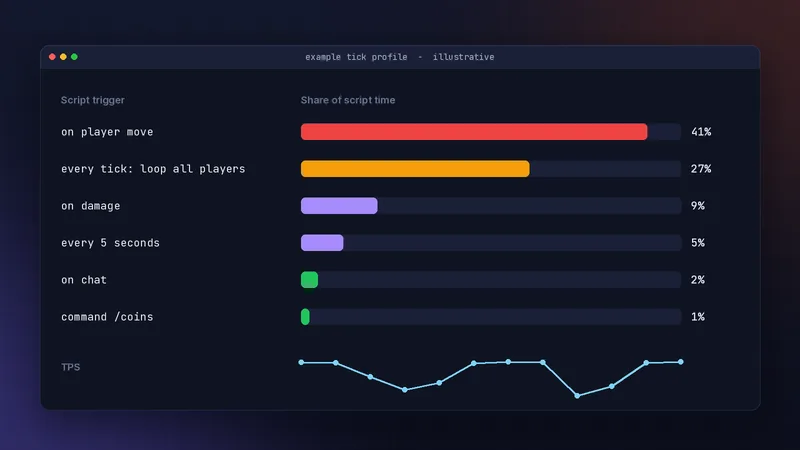
Measure before you change anything
Watch TPS and MSPT
A healthy server runs 20 ticks per second, which leaves 50 milliseconds per tick. Paper's /mspt command shows how long ticks actually take. If MSPT is well under 50, your scripts are not the bottleneck, whatever the TPS feels like on a laggy client.
Profile with spark
Install the spark profiler, run /spark profiler start during a busy period, stop it after a few minutes, and open the report. Look for Skript triggers near the top of the main thread. That list, not guesswork, decides what to optimise. Profile at a realistic player count; a script that is invisible with three players online can dominate with eighty, because per-player work multiplies.
The usual suspects
Every-tick loops
every tick with loop all players runs your code 20 times a second for every player online. Most checks do not need that. Ask whether an event can trigger the work instead, or whether every second or every five seconds is good enough.
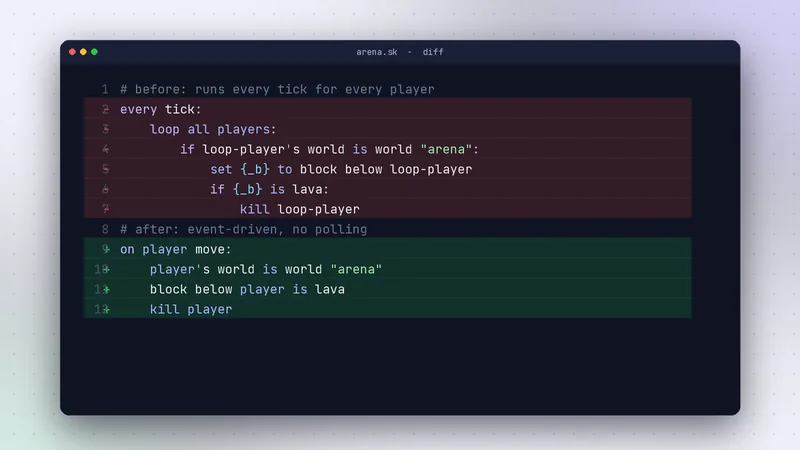
Busy events like player move
on player move fires very often. Keep these triggers tiny: check the cheapest condition first and stop early. Never do database writes, big loops or many variable writes inside them.
on player move:
    player's world is world "arena"
    block below player is lava
    kill player
The world check is first, so the trigger exits immediately for everyone outside the arena.
Write cheaper triggers
Exit early with conditions
Order conditions from cheapest and most likely to fail to most expensive. A permission or world check costs less than looping a list, so it belongs at the top. Use stop as soon as you know the rest of the trigger has nothing to do. In busy events, every line skipped for the majority of players is time saved on every tick.
Prefer locals and cache lookups
Reading the same global variable or expression many times in one trigger repeats work. Read it once into a local such as {_coins}, use the local, and write the result back once at the end.
command /buy:
    trigger:
        set {_u} to player's uuid
        set {_c} to {coins::%{_u}%} ? 0
        if {_c} < 100:
            send "&cYou need 100 coins."
            stop
        remove 100 from {_c}
        set {coins::%{_u}%} to {_c}
        give player 1 diamond
The global variable is read once and written once, however much logic sits in between.
Variables at scale
Keep lists bounded
Lists that only grow make variables.csv bigger, slow saves and use memory forever. Delete old entries, cap history lists, and use memory-only {-name} variables for session data. Loading every saved variable happens at startup, so a bloated variable file also makes every restart slower. Periodically review which lists your scripts create and whether anyone still reads them.
Database storage for large data
For thousands of players' stats, route those variables to SQLite or MySQL in config.sk, or move the data to a plugin built for it. Back up before changing storage, and test on a copy of the server. See variables explained for how patterns work.
Load and parse time
Long parse warnings
Skript 2.16.2 turned on a warning by default when a script takes longer than two seconds to parse. If you see it, that script is large or uses complex patterns, and startup and reloads will be slower.
Split large scripts
Break huge files into focused scripts, reuse code through functions, and replace long chains of else if with lists or options where it makes sense. Smaller files also reload faster while you work.
When to move code to Java
Signs you have hit the ceiling
Profiling keeps pointing at the same trigger after you have optimised it, the logic needs complex data structures, or you are using skript-reflect for most of the feature. That is a strong signal.
Porting one piece at a time
Move only the hot path into a small Java plugin and keep everything else in Skript. Our Skript vs Java comparison explains how to draw that line, and the troubleshooting hub covers other lag causes.
Frequently asked questions
Does Skript cause lag?
Not by itself. Lag usually comes from scripts doing heavy work every tick or on every player movement. Profile with spark to see which triggers actually cost time.
What is the most common Skript performance mistake?
Using every tick with a loop over all players for checks that an event could handle, or that only need to run every few seconds.
How many variables is too many?
There is no fixed number, but lists that grow forever eventually slow saves and use memory. Delete old entries and move large datasets to a database.
Written and checked by the SkriptPlugin Editorial Team against Skript 2.16.2 on Paper. Syntax can change between releases, so confirm details in the official documentation for your version. Read our editorial policy.