Skript Plugin: Script Your Minecraft Server in Plain English
Skript is a free, open-source plugin for Paper servers that turns readable lines such as on join: into working commands, events and game mechanics. This site is an independent guide to getting it safely, installing it, and writing scripts that hold up on a live server.
1# welcome.sk2onjoin:
3send"&aWelcome to the server, %player%!"toplayer4if{coins::%player's uuid%}is not set:
5set{coins::%player's uuid%}to10067command /coins:
8trigger:
9send"&6Balance: %{coins::%player's uuid%}%"
server console
>sk reload welcome[INFO][Skript] Reloading welcome.sk...[INFO][Skript]Successfully reloaded welcome.sk.[INFO]Alex joined the game[INFO]Welcome to the server, Alex!>_
A scripting language for Minecraft servers that reads close to English. You describe what should happen and when, and Skript turns it into server behaviour.
Writing a Bukkit or Paper plugin normally means learning Java, setting up a build tool, compiling a jar and restarting the server for every change. Skript was started by Njol to remove that barrier, was carried forward by Mirreski, and is now maintained by the SkriptLang team on GitHub. The goal has stayed the same: let server owners add their own features without becoming Java developers first.
How it works
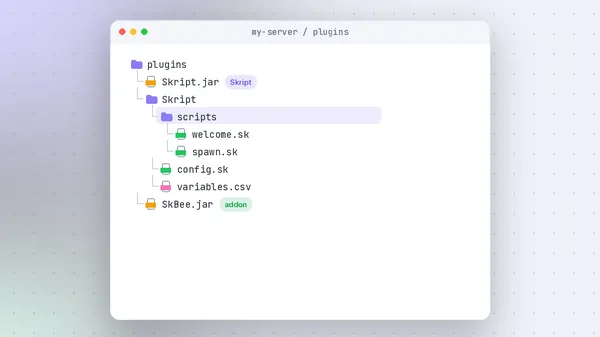
You write plain text files ending in .sk and place them in plugins/Skript/scripts/. When the server starts, or when you run /sk reload, Skript parses each file, matches every line against its library of known syntax, and registers the result as event listeners, commands and timed tasks. If a line cannot be understood, Skript tells you the file and line number instead of silently failing.
Who should use it
Server owners who want custom commands, join messages, rewards, small economies or minigame rules; staff who need quick tools; and learners who want a gentle first step into programming logic. It also suits Java developers who want to sketch an idea in minutes before committing to a full plugin.
Who should not
If you are building a large network feature with heavy per-tick logic, complex data models or strict performance budgets, a compiled Java plugin will usually serve you better. Skript is not a replacement for well-designed plugins that already solve a problem; it is the glue and the custom layer around them.
Skript vs a traditional Java plugin
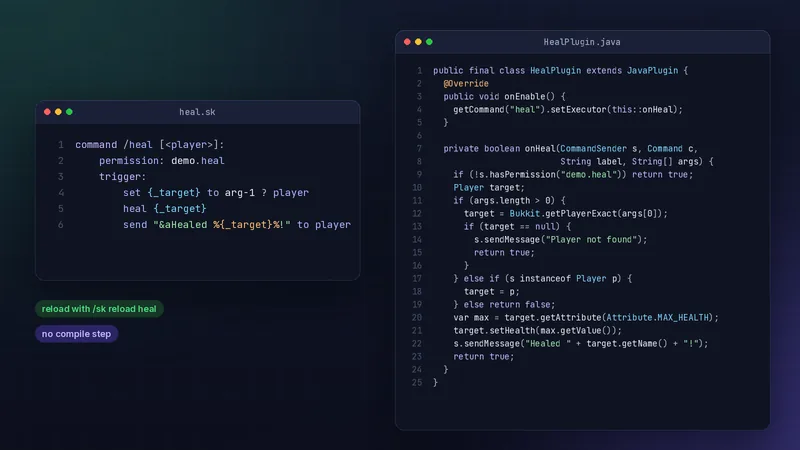
The same /heal command, written both ways. The Java version is not hard for a developer, but it needs a project, a build and a server restart. The Skript version is edited and reloaded live.
getCommand("heal").setExecutor((s, c, l, a) -> {
if (!(s instanceofPlayer p)) returnfalse;
if (!p.hasPermission("demo.heal")) returntrue;
p.setHealth(p.getAttribute(Attribute.MAX_HEALTH).getValue());
p.sendMessage("Healed!");
returntrue;
}); // plus plugin.yml, a build and a restart
Expert take
Treat Skript as the fastest way to get a server idea into players' hands, then measure. Most community servers never outgrow it for commands, messages and light game rules. When a script starts running on every tick or every movement, that is the signal to optimise it or move that one piece to Java.
What Skript lets you build
Nine capabilities that cover most of what server owners reach for, and the practical benefit of each.
Human-readable scripting
Lines like "give player 1 diamond" do exactly what they say. Indentation groups the steps, so a script reads top to bottom like a checklist.
starter-kit.sk
onfirstjoin:
giveplayer16 bread
giveplayera stone sword
send"&aThanks for joining, %player%!"onbreakof diamond ore:
send"&bLucky find!"toplayer
Staff can read and adjust scripts without a developer on call.
Minecraft event automation
React to joins, deaths, block breaks, chat, damage, respawns and dozens more events with a single header line.
Server rules happen automatically, every time.
Custom commands
Define commands with arguments, permissions, aliases and cooldowns in the command header.
Replace small single-purpose plugins with a few lines.
Variables that persist
Global variables save to disk by default, so balances and stats survive restarts.
Track coins, kills or homes without a database.
Conditions and logic
if, else if, else, loops and functions cover the logic most server features need.
Build real rules, not just fixed messages.
Scheduled tasks
Run code every few minutes, after a delay, or at a set time with every and wait.
Broadcasts, rewards and resets on a timer.
Addon ecosystem
Addons such as SkBee and skript-gui add syntax for menus, NBT, scoreboards and more.
Grow into advanced features when you need them.
Rapid prototyping
Edit a file, run /sk reload, test in game. No compiler, no restart.
Try an idea with players the same afternoon.
Custom gameplay mechanics
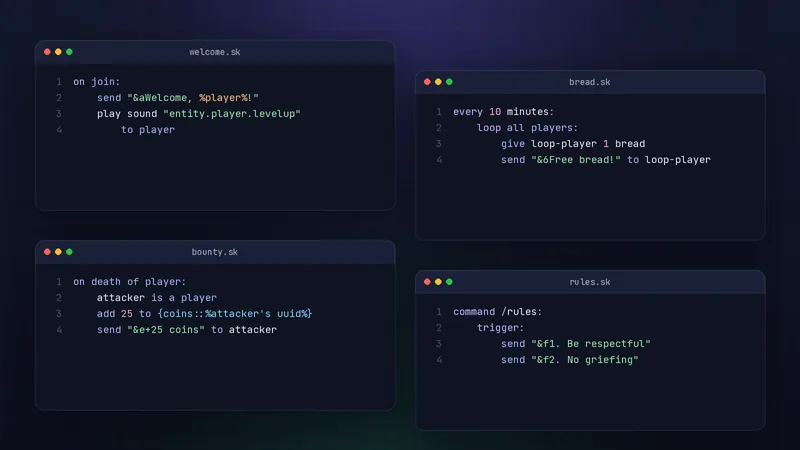
Combine events, items and variables into bounties, kits, parkour checkpoints or arena rules.
Give your server features players cannot find elsewhere.
How Skript works, start to finish
The path every script takes from your text editor to a player's screen.
Write a script
Plain text in any editor
Save as .sk
In plugins/Skript/scripts
Skript parses it
Errors list the line number
An event fires
A join, a command, a timer
Server runs it
Through the Paper API
Player sees it
Message, item, teleport
System requirements
Skript itself is light. What matters is the server it runs on. These are practical guidelines for 2.16.2; the release notes are the final word for each version.
Component
Minimum
Recommended
Server software
Paper 1.21.4 to 26.2
Latest stable Paper build for your Minecraft version
Java
Java 21 for Paper 1.21.x
Java 25 required by Paper 26.x
RAM
Whatever your server already needs Skript adds little on its own
Headroom for variables and addons large variable files load into memory
CPU
Any CPU that runs Paper well
Strong single-thread speed most script work runs on the main thread
Disk
A few MB for the jar and scripts
Room for variable backups over time
Network
None beyond the server itself
Optional: update checks reach GitHub
Recommended production setup
A separate test server with the same Paper and Skript versions
Scripts kept in version control or regular backups
Addons updated together with Skript, never ahead of it
A profiler such as spark installed before you need it
Spigot and CraftBukkit are not supported by current Skript releases. If you run Spigot, either switch to Paper or check the release notes for the last version that supported it.
Download Skript safely
Skript is free. The only place you need is the official SkriptLang releases page on GitHub, where every version is published with its changelog.
We do not host or mirror the jar. Files from re-upload sites can be outdated or modified, so always take Skript from the project itself. More detail on the download page.
Options are replaced at parse time, handy for prefixes and settings.
Compatibility
Skript follows a release model that supports roughly the last 18 months of Minecraft versions. Statuses below describe Skript 2.16.2.
Platform
Status
Notes
Paper 1.21.4 to 26.2
Supported
The platform Skript is built and tested for.
Older Paper versions
Check documentation
Use an older Skript release that lists your version in its notes.
Paper forks (e.g. Purpur)
Partial
Often work because they keep Paper's API, but are not the tested target.
Spigot / CraftBukkit
Not supported
Current releases require Paper.
Folia
Check documentation
Folia's threading model differs from Paper; confirm support before relying on it.
Java 21 / 25
Supported
Match the Java version your Paper build needs.
Menus, NBT, databases
Requires addon
Covered by addons such as skript-gui, SkBee and skript-db.
Velocity / BungeeCord proxy
Not applicable
Install Skript on each backend server, not on the proxy.
Pros and cons
An honest view, so you can decide whether Skript fits your server.
Where it shines
Fast developmentEdit, reload and test in under a minute.
Beginner friendlyReads like instructions, with clear error messages.
Low barrier to entryNo IDE, build tools or Java knowledge needed.
Large addon ecosystemExtra syntax for menus, NBT, files and SQL.
Great for prototypesTest an idea with real players before investing in Java.
Where it struggles
Performance ceilingHeavy per-tick or per-move logic costs more than equivalent Java.
Addon dependency riskAbandoned addons can block a Skript or Minecraft update.
Syntax changes between versionsMajor releases sometimes rename or remove syntax; read the changelog.
Large systemsBig codebases are easier to test and maintain as Java plugins.
Who uses Skript, and for what
Six common situations where Skript earns its place.
Server owners
Replace three small plugins with one readable file you control.
Scenario: A survival server adds /spawn, a join kit and a daily reward without new jars.
Developers
Prototype a mechanic before writing the Java version.
Scenario: A dev tests a bounty system with players for a week, then ports the parts that need speed.
Students
Learn events, variables, conditions and loops with instant feedback.
Scenario: A student builds a quiz command and sees each change in game seconds later.
Gamers
Add personal touches to a server for friends.
Scenario: A group adds death counters and a /rules command to their private world.
Content creators
Build challenge rules for videos and streams.
Scenario: A creator scripts "every 5 minutes, a random item" for a challenge series.
Communities
Give staff tools without handing out console access.
Scenario: Moderators get /report and a staff chat, all in one script.
Skript in pictures
What working with Skript actually looks like, from the file tree to the console.
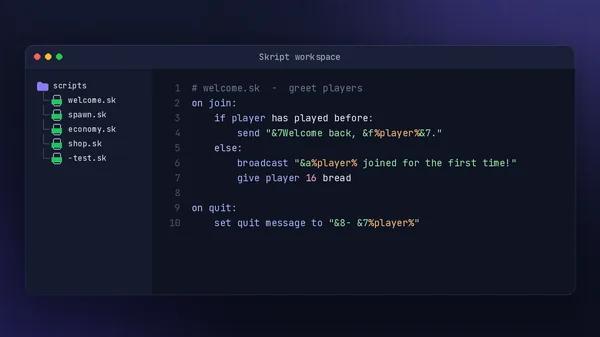
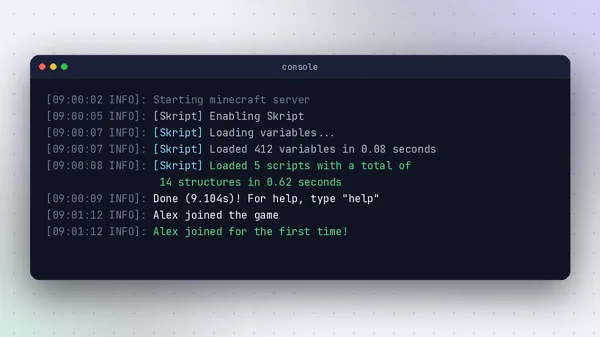
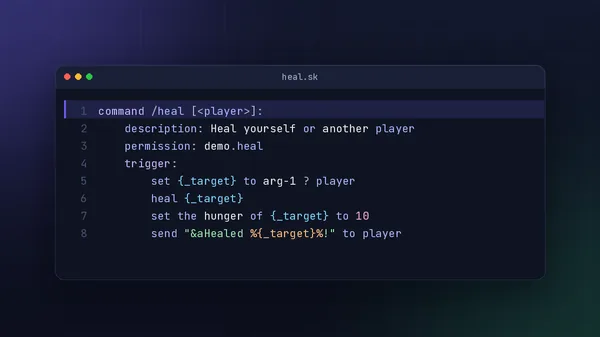
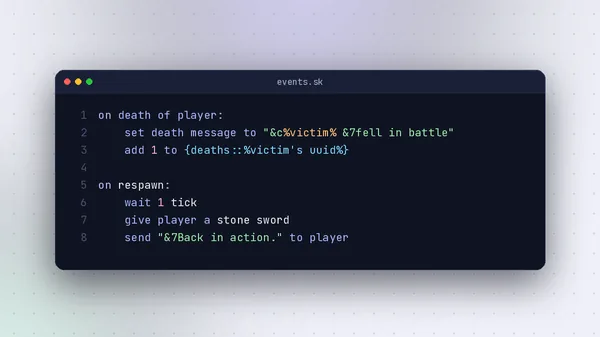
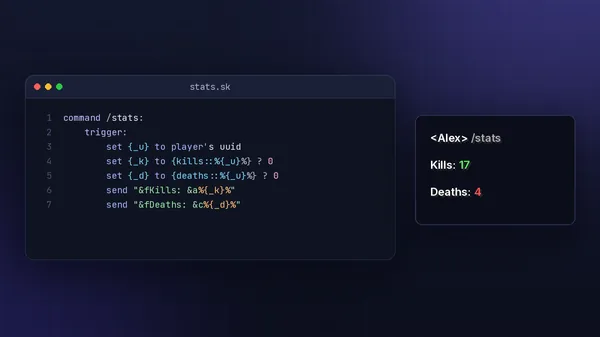
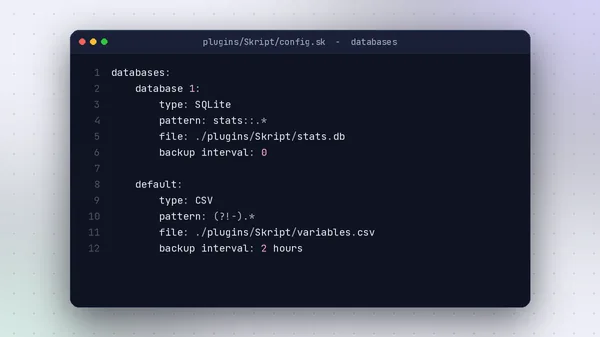
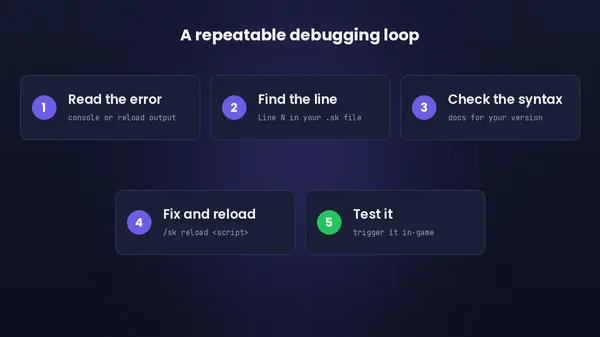
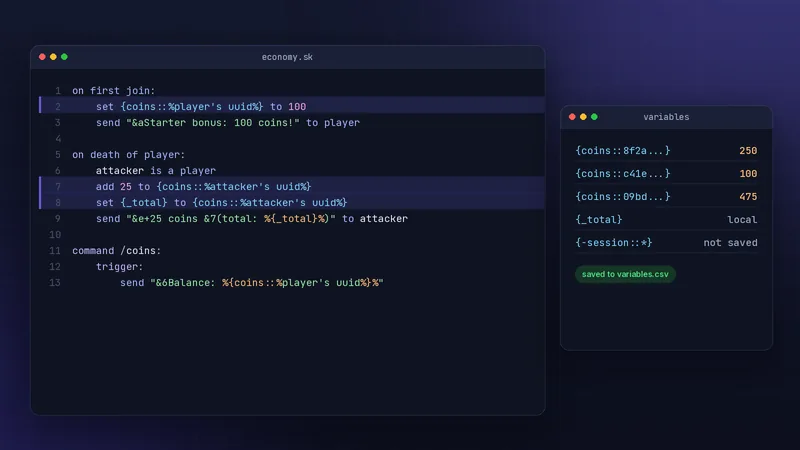
Skript code editorA welcome script open beside the scripts folderServer consoleSkript loading scripts and variables at startupPlugin folder setupWhere the jar, scripts and config liveBasic command scriptA /heal command with permission and targetEvent scriptDeath message and respawn kitVariable exampleKills and deaths read from variablesStorage configurationSending some variables to SQLite in config.skTroubleshooting workflowA five-step loop for fixing script errors
Troubleshooting the usual problems
Each fix follows the same pattern: likely cause, the change to make, and how to confirm it worked.
Skript does not appear in /plugins
Likely cause
Server is Spigot, Java is too old, or two Skript jars are present.
Fix
Run Paper, match the Java version, keep one jar in plugins/.
Verify
Restart and look for Skript in green in /plugins.
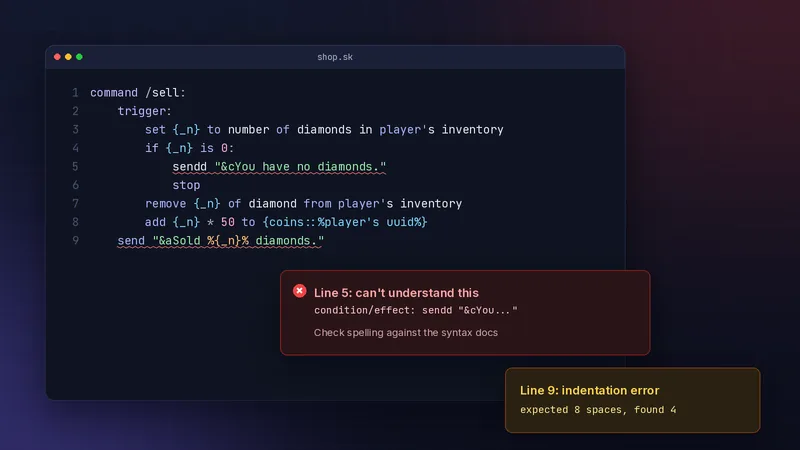
Can't understand this condition/effect
Likely cause
A typo, a missing addon, or syntax from another Skript version.
Fix
Compare the line with the docs for your exact version.
Verify
Run /sk reload on the script and confirm zero errors.
Indentation error
Likely cause
Mixed tabs and spaces, or a line indented to the wrong level.
Fix
Use 4 spaces per level and set your editor to show whitespace.
Verify
Reload and check that the line number in the error is gone.
Script loads but nothing happens
Likely cause
The event never fires, a condition fails, or the file starts with a hyphen.
Fix
Add a temporary broadcast at the top of the trigger to confirm it runs.
Verify
Trigger the event and watch chat for the test message.
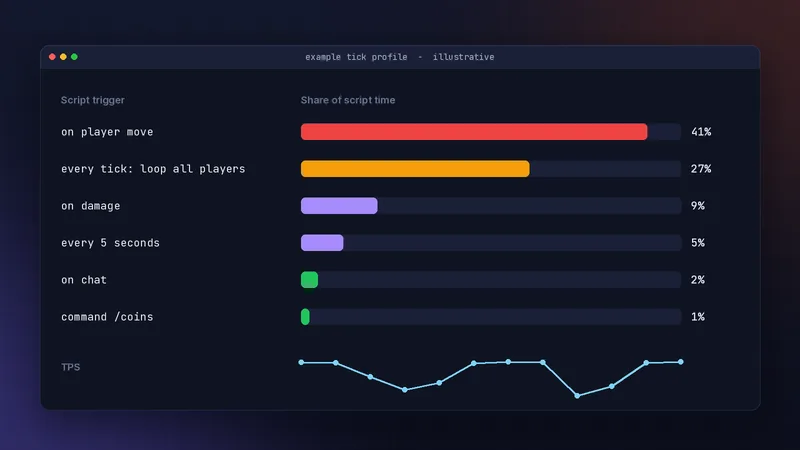
Server lag after adding a script
Likely cause
Work on every tick or every move event.
Fix
Move logic to specific events, cache results, use longer intervals.
Verify
Profile again and compare tick times.
Security and safe use
Skript runs with the same access as any plugin, so a script can do anything a plugin can. That is useful, and it is why sources matter.
Only download Skript from the official GitHub releases. Read every script you install from a forum or Discord before it goes on a live server, looking for commands that op players, run console commands, or send data to outside services. Addons extend what scripts can reach, so install the ones you actually use, from their official pages.
Keep permissions explicit on every command, test changes on a copy of your server, and back up plugins/Skript/ including variables.csv before updates. We cannot vouch for any third-party file, and we never claim a download is malware-free.
Before a script goes live
Source is the official project or a script you have read in full
Every command has a permission: line
No unexplained execute console command lines
Tested on a staging server with the same versions
Backup of the Skript folder taken today
Addon versions match the Skript version they list
Skript alternatives
Other ways to customise a server, and when each makes more sense.
Yes. Skript is open source under the GPL-3.0 licence and every release is free on the SkriptLang GitHub page. Some addons and paid script packs exist, but Skript itself costs nothing. Be wary of any site asking you to pay for or unlock the core plugin.
Do I need to know Java to use Skript?
No. Skript was created so server owners could add features without Java. You write readable lines in .sk files. Knowing basic logic such as conditions and loops helps, and you pick that up quickly by editing working examples.
Does Skript work on Spigot?
Current releases require Paper. Skript 2.16.2 supports Paper 1.21.4 to 26.2. If you run Spigot, the simplest path is switching to Paper, which can usually load your existing worlds and plugins.
Where do Skript scripts go?
Save scripts as .sk files inside plugins/Skript/scripts/. Subfolders are allowed. Files whose names start with a hyphen are ignored, which is a handy way to disable a script without deleting it.
How do I reload a script?
Run /sk reload followed by the script name, for example /sk reload welcome. Use /sk reload scripts to reload every script. Avoid the server-wide /reload command, which can break plugins.
Is Skript bad for performance?
Not by default. Most lag comes from scripts that do heavy work on every tick or every player movement. Event-driven scripts with sensible timers run comfortably on busy servers. Profile first, then optimise the hot spots.
Latest guides
Step-by-step articles for every stage, from first install to performance tuning.
 SkriptPlugin