Skript Commands: Beginner Guide
Custom commands are usually the first thing people build with Skript, and for good reason: a few lines replace a whole plugin. This guide covers how a command is structured, how arguments work, the options you can set in the header, cooldowns, and two complete commands you can adapt for your own server today.
 SkriptPlugin Editorial TeamIndependent Skript guides
Updated Published 4 min read
SkriptPlugin Editorial TeamIndependent Skript guides
Updated Published 4 min read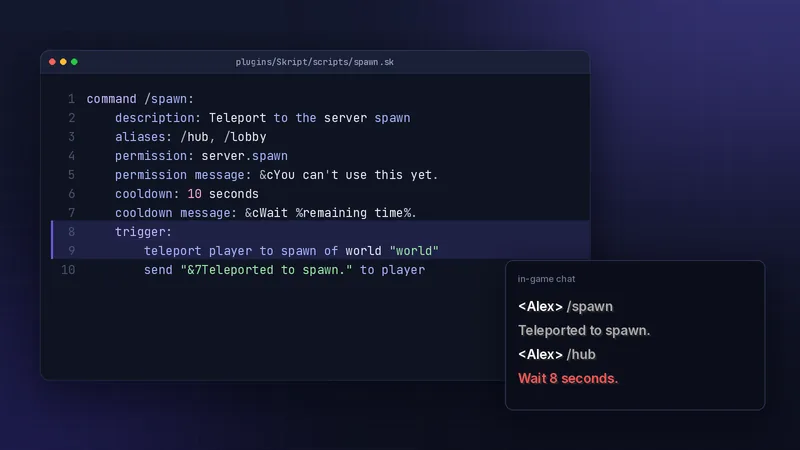
Anatomy of a Skript command
The command line itself
A command starts with the word command, the command name with a slash, any arguments, and a colon. Everything indented below belongs to that command.
command /hello:
    trigger:
        send "Hello, %player%!" to player
The trigger section
trigger: holds the code that runs when someone uses the command. Lines inside it are indented one level deeper. Inside a command, player refers to whoever ran it.
Arguments
Required and optional arguments
Arguments go after the command name in angle brackets with a type: <player>, <number>, <text>. Wrap one in square brackets to make it optional. You can give an optional argument a default value with =. Common types include player, offline player, integer, number, text, item type and world. Picking the most specific type means Skript validates input for you, so a command expecting a whole number never receives 2.5 or abc.
command /gift <player> [<integer=1>]:
    permission: staff.gift
    trigger:
        give arg-2 of diamond to arg-1
        send "&aYou received %arg-2% diamond(s)." to arg-1
Using arg-1 and arg-2
Arguments are numbered in order. arg-1 is the first one, arg-2 the second. If a player types the wrong type, such as a word where a number belongs, Skript replies with the usage message and never runs the trigger. When an optional argument is left out and has no default, it is simply not set, so check it with if arg-1 is set: before using it, or use arg-1 ? player to fall back to the sender.
Command options
Options sit between the command line and trigger:.
Permissions and messages
permission: blocks anyone without that node; permission message: replaces the default refusal. Give every command a permission, even simple ones, so you can control it later from your permissions plugin. A consistent naming scheme such as server.spawn, server.home and staff.announce makes it easy to grant whole groups with a wildcard like server.* for regular players.
Aliases, usage and executable by
aliases: adds other names, usage: sets the help text shown on bad input, and executable by: limits a command to players or console. description: appears in the server's help listing. Restricting a command to players matters whenever the trigger uses player, because the console has no location, inventory or health to work with.
command /spawn:
    description: Teleport to the server spawn
    aliases: /hub, /lobby
    executable by: players
    permission: server.spawn
    permission message: &cYou can't use this yet.
    trigger:
        teleport player to spawn of world "world"
        send "&7Teleported to spawn." to player
Cooldowns
Setting a cooldown
Add cooldown: with a time span such as 10 seconds or 1 day. Skript tracks it per player and refuses to run the trigger again until it expires. Cooldowns are perfect for teleports, kits and rewards, where repeating the command quickly would be either spammy or exploitable. If a trigger can fail, for example when an inventory is full, you can cancel the cooldown inside the trigger so the player is not punished for an attempt that gave them nothing.
Cooldown messages and bypass
cooldown message: can use %remaining time% to tell the player how long is left. cooldown bypass: names a permission that skips the cooldown for staff. Add cooldown storage: with a variable name if the cooldown must survive restarts.
Two commands worth copying
A staff announcement
command /announce <text>:
    permission: staff.announce
    usage: /announce <message>
    trigger:
        broadcast "&8[&cAnnouncement&8] &f%arg-1%"
Staff get a formatted broadcast without console access. Because the argument is <text>, everything after the command becomes the message.
A daily reward
command /daily:
    executable by: players
    cooldown: 1 day
    cooldown message: &cCome back in %remaining time%.
    cooldown storage: {cooldown::daily::%player's uuid%}
    trigger:
        give player 5 emerald
        send "&aDaily reward claimed!" to player
The storage variable keeps the cooldown through restarts, so players cannot claim twice by waiting for a reboot.
Testing and tab completion
Reload and test
Save the file and run /sk reload with the script name. Test as a normal player too, not only as an operator, because operators often have every permission and hide mistakes. Try the wrong inputs on purpose: no arguments, a misspelled player name, a negative number. A command that handles bad input politely feels far more polished to players than one that only works on the happy path.
Tab completion basics
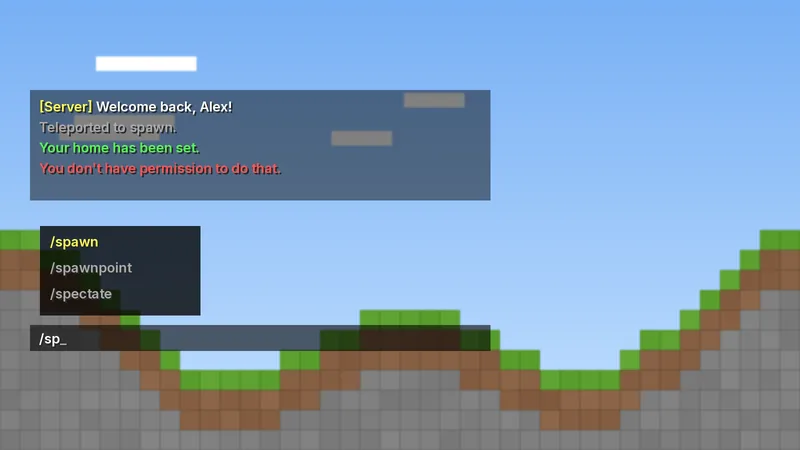
Skript registers commands with the server like any plugin, so players see them when they press Tab. Keep names short and memorable, and use aliases instead of near-duplicate commands. When something does not respond, the troubleshooting hub lists the usual causes, and beginner examples has more commands to adapt.
Frequently asked questions
How do I make a Skript command only work for staff?
Add a permission: line with a node such as staff.tools, then grant that node to your staff group in your permissions plugin. Players without it get the permission message.
What does arg-1 mean in Skript?
It is the first argument the player typed after the command. arg-2 is the second, and so on, in the order they appear on the command line.
Do Skript cooldowns reset on restart?
By default they do not persist. Add cooldown storage: with a variable such as {cooldown::daily::%player's uuid%} to keep them across restarts.
Written and checked by the SkriptPlugin Editorial Team against Skript 2.16.2 on Paper. Syntax can change between releases, so confirm details in the official documentation for your version. Read our editorial policy.