Best Skript Addons for Minecraft Servers
Skript covers a lot on its own, but addons are how most servers reach menus, NBT data, external files and SQL databases. This guide explains what an addon actually changes, walks through the best-known options and what each is good for, and ends with a short checklist for choosing addons that will survive your next update.
 SkriptPlugin Editorial TeamIndependent Skript guides
Updated Published 4 min read
SkriptPlugin Editorial TeamIndependent Skript guides
Updated Published 4 min read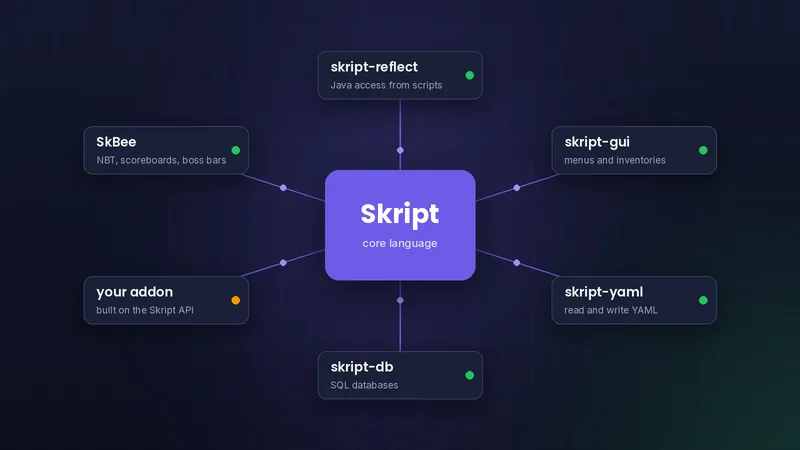
What a Skript addon actually does
Addons add syntax, not scripts
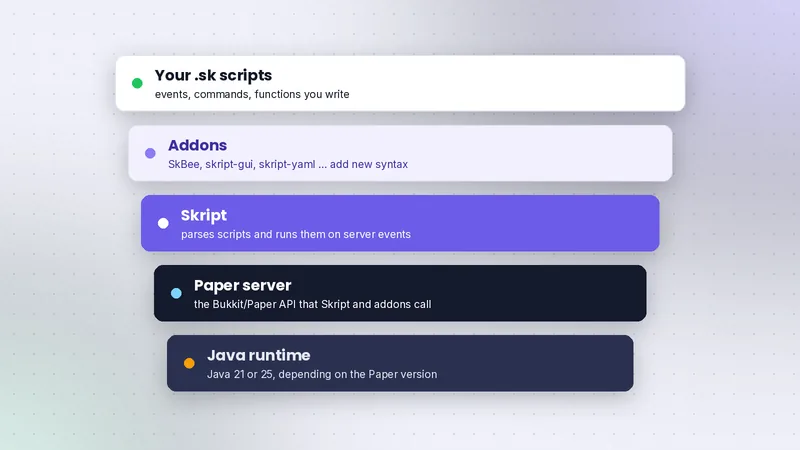
An addon is a regular plugin jar that registers new events, conditions, effects and expressions with Skript. Once installed, your .sk files can use those lines as if they were built in. An addon does nothing on its own; it waits for your scripts to call it.
How to install an addon
Stop the server, place the addon jar in plugins/ beside Skript, and start again. Addons load after Skript, so Skript must be present. Check the console for the addon's own startup line, then reload any script that uses its syntax.
Version match matters
Every addon is built against specific Skript versions. Installing an addon that predates your Skript release is the most common reason syntax suddenly stops parsing after an update.
SkBee
What it adds
SkBee is a large, actively used addon that fills many gaps: NBT on items and entities, scoreboards and teams, boss bars, structures, recipes, bound regions and more. Many tutorials on community sites assume it is installed.
When to use it
Reach for SkBee when you need item data that survives restarts, sidebar scoreboards, or custom recipes. If you only need commands and messages, you do not need it yet. Installing it early is harmless, but keep it updated alongside Skript.
skript-gui and menu addons
Building menus
Inventory menus are one of the most requested features. skript-gui gives a structured way to create a chest menu, place items in slots, and run code when a slot is clicked, without tracking click events by hand.
Doing it without an addon
Skript can open chest inventories and react to inventory clicks on its own. That works for one or two simple menus. Once you have several menus with pages, a dedicated GUI addon keeps scripts shorter and easier to maintain.
skript-reflect
Calling Java from scripts
skript-reflect lets scripts import Java classes, call methods on Bukkit and Paper objects, and even listen to events Skript does not know about. It is the escape hatch when nothing else exposes what you need.
Risks to weigh
Reflection ties your scripts to internal method names that can change between Minecraft versions. It also gives scripts full Java power, so treat third-party scripts that use it with extra caution. If most of a feature needs reflection, writing it as a Java plugin is often cleaner.
Data addons: skript-yaml and skript-db
skript-yaml for config files
skript-yaml reads and writes YAML files, which is handy for editable settings, translations, or exporting data other plugins can read. It keeps staff-facing configuration out of your script code.
skript-db for SQL
skript-db connects scripts to MySQL or similar databases. Use it when data must be shared across servers or read by a website. For single-server storage, Skript's own database support in config.sk is often enough, as covered in variables explained.
Choosing addons safely
Check version support
Before installing, open the addon's latest release notes and confirm it lists your Skript and Minecraft versions. Look at how recently it was updated and whether issues get answers. Documentation aggregators such as SkriptHub and skUnity help you compare syntax, but the addon's own release page is the source of truth.
Fewer is better
Each addon adds startup time, possible syntax clashes, and one more thing that must update before you can. Install addons for features you are building now, remove the ones you stopped using, and note in each script which addon it depends on. For problems that look like clashes, see fixing common errors.
| Addon | Main use | Install when |
|---|---|---|
| SkBee | NBT, scoreboards, boss bars, recipes | You need data or visuals core Skript lacks |
| skript-gui | Inventory menus | You build more than a couple of menus |
| skript-reflect | Java access from scripts | Nothing else exposes the API you need |
| skript-yaml | YAML files | Settings or data should live in editable files |
| skript-db | SQL databases | Data is shared between servers or a website |
Frequently asked questions
Do Skript addons need Skript installed?
Yes. Addons register syntax with Skript, so Skript must be installed and load first. Without it, the addon either refuses to start or does nothing.
Can too many addons cause problems?
They can. Two addons may register similar syntax, and each one must support your Skript version before you update. Install only what your scripts use.
Where do I download Skript addons?
From each addon's official page, usually GitHub, Modrinth or Hangar. Avoid re-upload sites for the same reasons you avoid them for Skript itself.
Written and checked by the SkriptPlugin Editorial Team against Skript 2.16.2 on Paper. Syntax can change between releases, so confirm details in the official documentation for your version. Read our editorial policy.