Skript Variables Explained
Variables are how a script remembers things: a player's coins, a kill count, the last time someone claimed a reward. Skript makes them easy to create, which also makes them easy to misuse. This guide explains each kind of variable, how storage works, and the habits that keep player data accurate as your server grows.
 SkriptPlugin Editorial TeamIndependent Skript guides
Updated Published 3 min read
SkriptPlugin Editorial TeamIndependent Skript guides
Updated Published 3 min read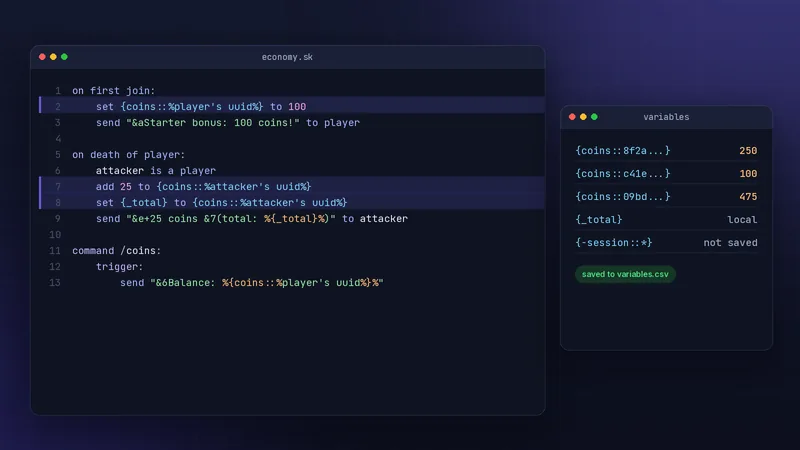
What a variable is in Skript
Braces mark a variable
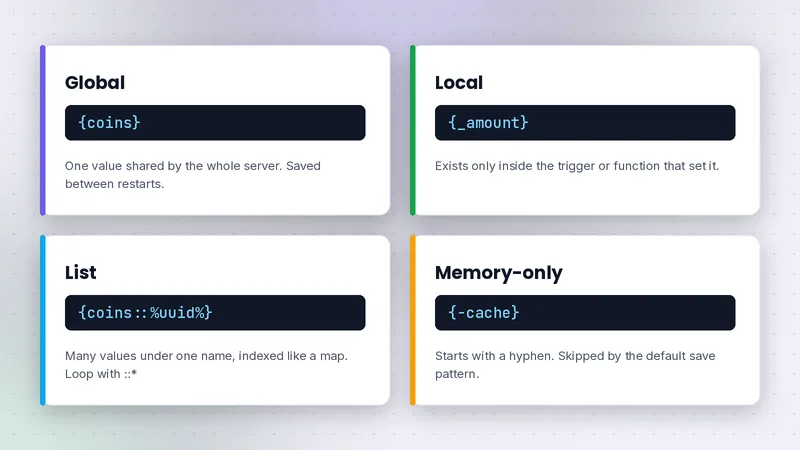
Anything inside curly braces is a variable: {coins}, {spawn}, {kills::%player's uuid%}. You do not declare it first. Setting it creates it, and reading one that was never set returns nothing rather than an error.
Setting, adding and deleting
set {server::motd} to "Welcome to our server"
add 5 to {coins::%player's uuid%}
remove 5 from {coins::%player's uuid%}
delete {coins::%player's uuid%}
set replaces the value, add and remove change numbers or lists, and delete clears it completely.
Global variables
Saved to disk by default
A plain variable like {coins} is global: every script can read it, and it is saved to plugins/Skript/variables.csv so it survives restarts. That convenience is why server economies can be written without a database. Skript writes changes to the file in the background and keeps backups on the interval set in config.sk, so you rarely need to think about saving. Still, back up the file before big changes, because it holds every global variable your scripts have created.
Naming with player UUIDs
Put the player's UUID in the name, not their username. Names can change; UUIDs do not.
on first join:
    set {coins::%player's uuid%} to 100

command /coins:
    trigger:
        send "&6Balance: %{coins::%player's uuid%}%"
Local variables
The underscore prefix
A variable starting with an underscore, such as {_total}, is local. It exists only inside the trigger or function that created it and disappears when that code finishes. It is never saved.
When to prefer locals
Use locals for anything temporary: a calculation, a target player, a loop counter. They are faster to work with and cannot collide with another script's data. A good habit is copying a global into a local at the start of a trigger when you will read it several times.
command /pay <player> <integer>:
    trigger:
        set {_from} to player's uuid
        set {_to} to arg-1's uuid
        set {_bal} to {coins::%{_from}%} ? 0
        if {_bal} < arg-2:
            send "&cNot enough coins."
            stop
        remove arg-2 from {coins::%{_from}%}
        add arg-2 to {coins::%{_to}%}
        send "&aSent %arg-2% coins to %arg-1%."
The locals make the logic readable and vanish when the command finishes, leaving only the two balances changed.
List variables
The :: separator
Two colons turn a variable into a list. {coins::%player's uuid%} is one entry in the coins list, keyed by UUID. {coins::*} refers to every entry at once.
Looping a list
command /coinlist:
    permission: staff.coins
    trigger:
        loop {coins::*}:
            send "&7%loop-index%: &f%loop-value%" to player
loop-index is the key (here, a UUID) and loop-value is the stored number. You can also count a list with size of {coins::*} and delete the whole list with delete {coins::*}, which is useful for seasonal resets. Be careful with that last one on a live server; there is no undo apart from your backup.
Memory-only variables and storage
The hyphen prefix
With Skript's default config.sk, a global variable whose name starts with a hyphen, like {-online::*}, is kept in memory but not written to disk. It survives reloads of scripts but is cleared on restart, which is ideal for session data.
Moving variables to a database
Large servers can send some variables to SQLite or MySQL by adding a database block to config.sk with a pattern that matches certain variable names. Variables are saved to the first database whose pattern matches. Test this on a copy of your server and back up variables.csv first.
Common mistakes
Using player names instead of UUIDs
{coins::%player%} may store the name, so a player who renames loses their balance. Use %player's uuid% explicitly in every per-player variable.
Unbounded lists
Lists that only ever grow, such as logging every chat message, slowly inflate variables.csv and server memory. Delete entries you no longer need, cap lists, or use memory-only variables. Our performance guide covers this in depth, and commands shows variables in use.
Frequently asked questions
Where does Skript save variables?
By default in plugins/Skript/variables.csv. You can route some or all variables to SQLite or MySQL by configuring databases in config.sk.
What is the difference between {var} and {_var}?
{var} is global and saved; any script can read it. {_var} is local to the current trigger or function and disappears when that code ends.
How do I loop through a list variable?
Use loop {name::*}: and read loop-index for each key and loop-value for each stored value inside the loop.
Written and checked by the SkriptPlugin Editorial Team against Skript 2.16.2 on Paper. Syntax can change between releases, so confirm details in the official documentation for your version. Read our editorial policy.